

Plugin settings
All settings of Orbitvu SELF HOSTED V2 in Stores → Configuration → Orbitvu Self Hosted V2, section by section.
The settings are in the Magento back office in Stores → Configuration → Orbitvu Self Hosted V2. They apply to all store views (global scope).
General
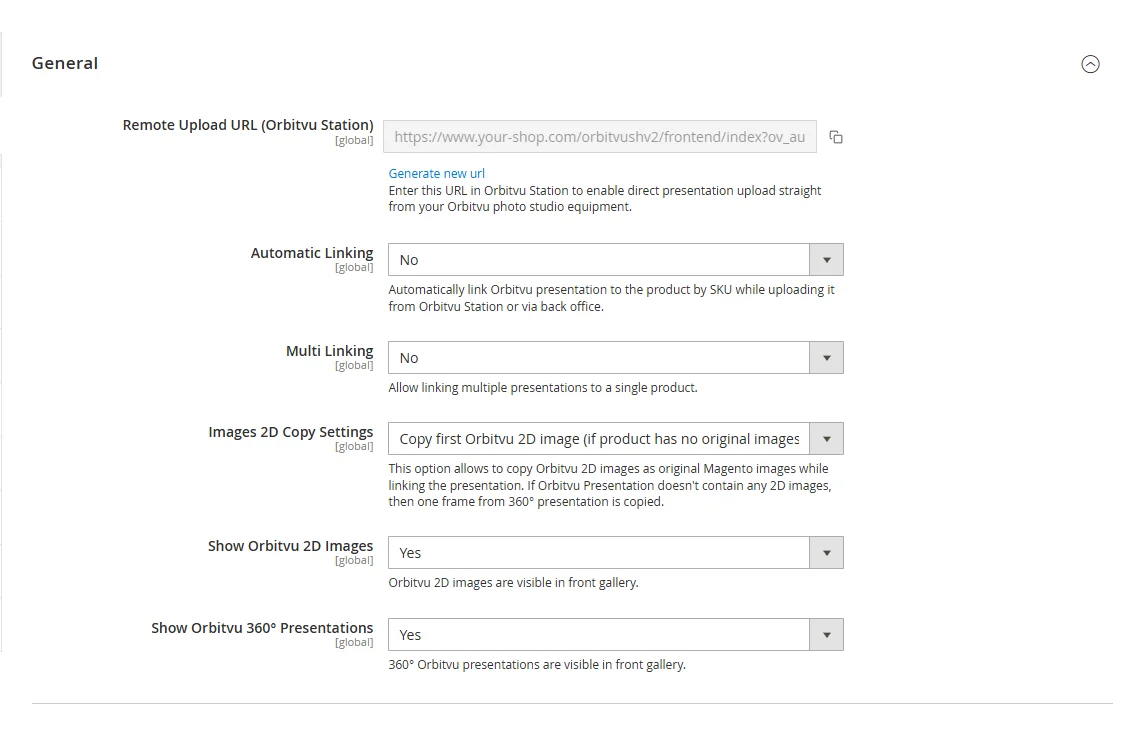
| Option | Description |
|---|---|
| Remote Upload URL (Orbitvu Station) | Paste this URL in Orbitvu Station to send presentations directly to the shop, see Uploading Orbitvu presentations to the shop. It contains a secret key: do not share it. Generate new url creates a new key. |
| Automatic Linking | Links an uploaded presentation to the product with the same SKU, when it is sent from Orbitvu Station or uploaded in the back office. |
| Multi Linking | Allows linking more than one presentation to one product. |
| Images 2D Copy Settings | Copies Orbitvu 2D images to the native Magento images when a presentation is linked: only the first 2D image when the product has no images, or always all 2D images. A presentation without 2D images gives one frame of its 360° presentation. |
| Show Orbitvu 2D Images | Shows Orbitvu 2D images in the product page gallery. |
| Show Orbitvu 360° Presentations | Shows Orbitvu 360° presentations in the product page gallery. |
Viewer
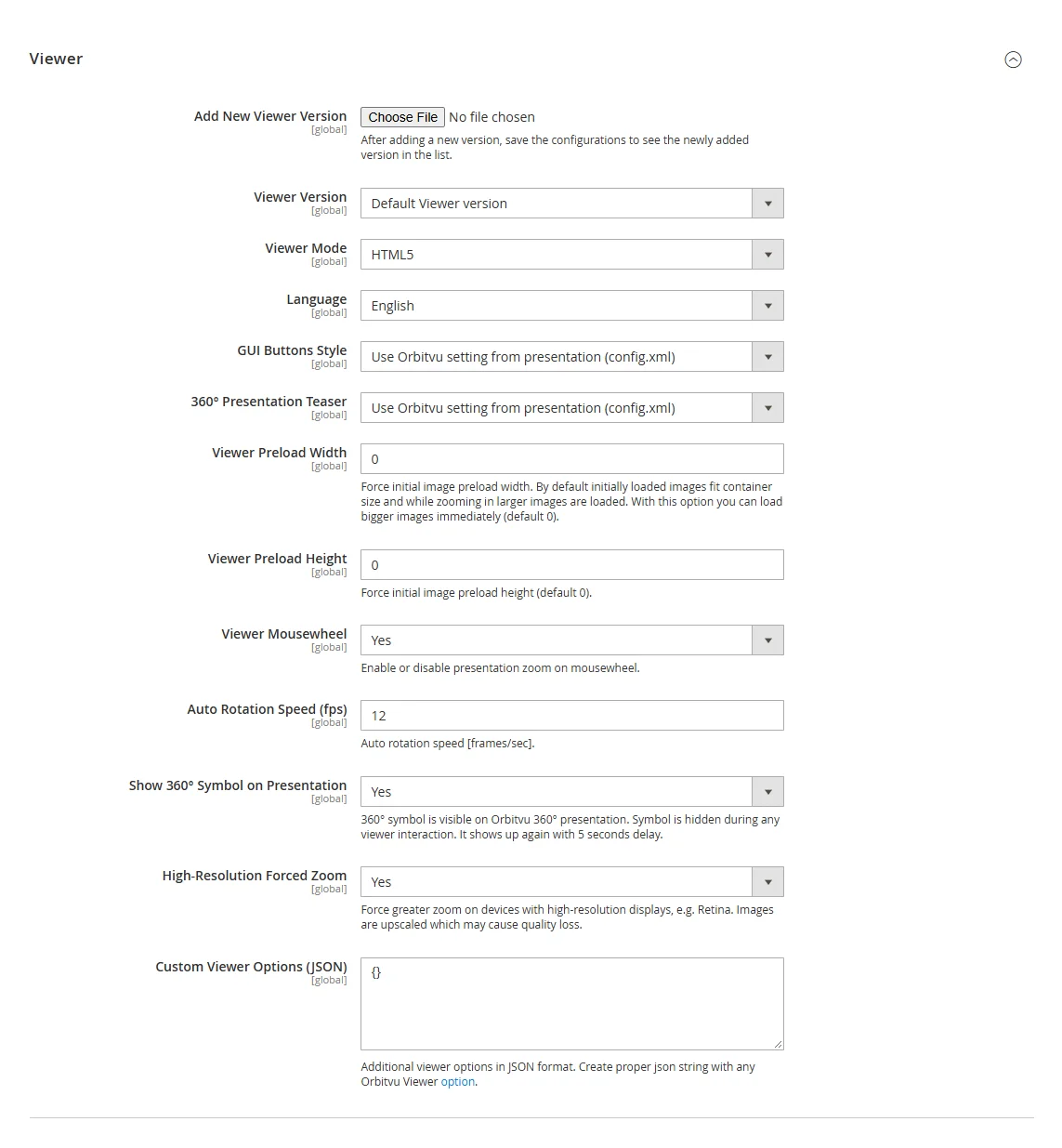
| Option | Description |
|---|---|
| Add New Viewer Version | Uploads an Orbitvu Viewer package. After uploading, save the configuration to see the new version in Viewer Version. |
| Viewer Version | Orbitvu Viewer version used on the product page. The default viewer is installed and updated with the plugin. |
| Viewer Mode, Language, GUI Buttons Style | Working mode, language and button style of the Orbitvu Viewer. Read more in the Orbitvu Viewer manual. |
| 360° Presentation Teaser | How a 360° presentation starts: auto-rotation, a play button, one rotation, zoom in, no teaser, or the setting saved in the presentation. |
| Viewer Preload Width / Height | Forces the size of the images loaded first. By default they fit the gallery and larger images are loaded when zooming in (default 0). |
| Viewer Mousewheel | Zooms the presentation with the mouse wheel. |
| Auto Rotation Speed (fps) | Speed of the auto-rotation, in frames per second. |
| Show 360° Symbol on Presentation | Shows the 360° symbol on a 360° presentation. It is hidden while the visitor uses the viewer and shown again 5 seconds later. |
| High-Resolution Forced Zoom | Allows a greater zoom on high-resolution displays (e.g. Retina). Images are upscaled, which may lower their quality. |
| Custom Viewer Options (JSON) | Additional Orbitvu Viewer options in JSON format. |
Front Gallery Image Dimensions
| Option | Description |
|---|---|
| Keep Original Image Sizes in Zoom/Lightbox | Uses the original image size in zoom and lightbox; Zoom/Lightbox Image Width and Height are then ignored. |
| Zoom/Lightbox Image Width / Height | Size of the images in zoom and lightbox. |
| Medium Image Width / Height | Size of the main gallery image. |
| Thumbnails Width / Height | Size of the gallery thumbnails. |
Gallery
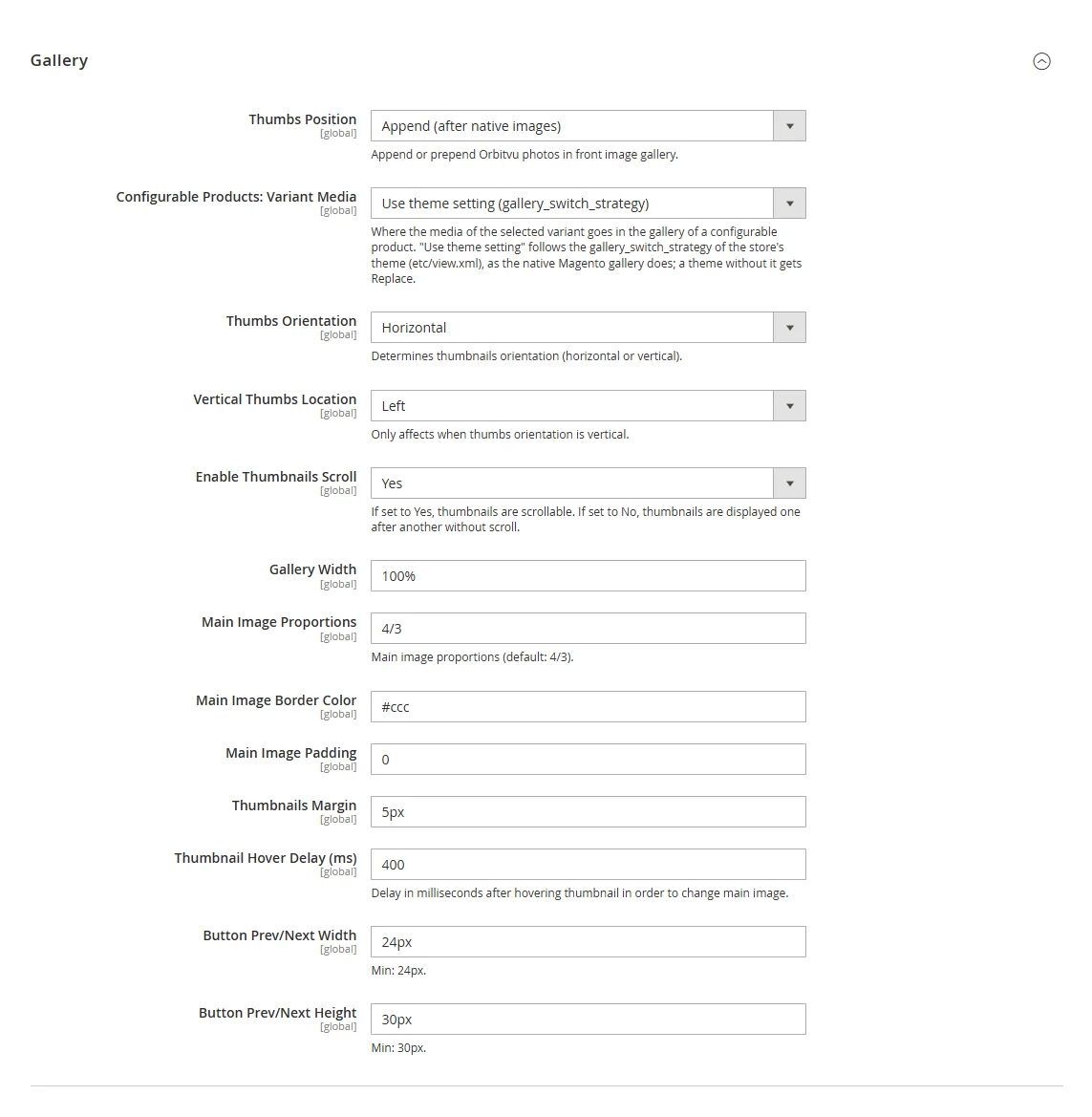
| Option | Description |
|---|---|
| Thumbs Position | Shows Orbitvu items after the native Magento images, before them, or instead of them. |
| Configurable Products: Variant Media | Where the media of the selected variant go in the gallery of a configurable product: Use theme setting (default: as the native Magento gallery of the theme; variant first in Luma, after the configurable product in the Hyvä default theme), Replace (only the variant), Prepend (variant first), Append (configurable product first). |
| Thumbs Orientation | Horizontal or vertical thumbnails. |
| Vertical Thumbs Location | Side of vertical thumbnails. |
| Enable Thumbnails Scroll | Thumbnails scroll; otherwise they are displayed one after another. |
| Gallery Width, Main Image Proportions, Main Image Border Color, Main Image Padding, Thumbnails Margin | Size and look of the gallery (default proportions: 4/3). |
| Thumbnail Hover Delay (ms) | Delay after hovering a thumbnail before the main image changes. |
| Button Prev/Next Width / Height | Size of the previous/next buttons (at least 24 × 30 px). |
Zoom Magnifier
| Option | Description |
|---|---|
| Zoom Magnifier Enabled | Shows the zoomed image when hovering the main image. |
| Display Lenses | Shows a square lens over the hovered area. |
| Zoom Lenses Inside Gallery | Shows the zoomed image inside the gallery. |
| Lenses Border Color, Lenses Box Shadow | Look of the lens (transparent = no border, none = no shadow). |
| Main Image Opacity on Hover | Opacity of the main image while hovered (1 = no change). |
| Zoomed Image Border Color, Box Shadow, Background | Look of the zoomed image. |
| Enable Max Zoom, Max Zoom Width / Height | Limits the size of the zoomed image, e.g. 1800px × 1500px. |
Lightbox
| Option | Description |
|---|---|
| Lightbox Enabled | Opens the gallery in a lightbox. |
| Lightbox Image Proportions | Proportions of the lightbox image (default 4/3). |
| Lightbox Colorized Background | Colours the lightbox background based on the image. |
| Lightbox Thumbnails | Shows thumbnails in the lightbox. |
| Lightbox Buttons Shadow | Shadow under a hovered button. |
| Enable Max Zoom, Max Zoom Width / Height | Limits the size of the zoomed image in the lightbox. |
Batch Actions
Auto Synchronizing URL and Auto Linking URL, see Batch operations.
Health Check
Health Check URL, see Health check.